
How I Built This Blog with Astro, Keystatic, and Claude Code
TL;DR - Astro 5 for zero-JS static rendering, Keystatic as a file-based CMS (dev only), Codeberg for Git hosting, Cloudflare Workers for edge deployment, and Claude Code as an AI pair programmer. The result: a blog that scores 100 across all Lighthouse categories and costs nothing to host.
This site was built using five tools:
- Astro for the framework
- Keystatic for content management
- Codeberg for Git hosting
- Cloudflare Workers for deployment, and
- Claude Code as the coding assistant.
Here's how the pieces fit together, what trade-offs I made, and why this stack works well for a simple tech blog.
Astro - the base framework
 astro.build
Most frameworks ship JavaScript to the browser whether you need it or not. Astro takes the opposite approach: zero client-side JS by default. It renders everything to static HTML at build time and only hydrates interactive components when you explicitly opt in.
For a content-heavy blog, this is ideal. Pages load fast because there's nothing to parse or execute on the client. Astro also supports multiple content formats out of the box - I use Markdoc for blog posts, which gives me the simplicity of Markdown with the extensibility of custom components.
Image optimization at build time
Astro processes images through Sharp during the build, generating optimized WebP and AVIF formats automatically. Hero images are usually the heaviest part of a blog post, so compiling them ahead of time means every visitor gets the smallest possible file without any runtime processing.
Custom Markdoc components
Through a simple markdoc.config.mjs, I override how links and images render. External links automatically open in new tabs with proper rel="noopener noreferrer" attributes. Images resolve through Astro's optimization pipeline. Small changes, but they apply to every post automatically.
Keystatic for content editing
Writing blog posts in raw files works, but having a proper CMS with a visual editor, image uploads, and draft management makes the workflow faster.
Keystatic fills that role. It's a file-based CMS that stores everything as local files - Markdoc for content, JSON for metadata. No database, no external service, no vendor lock-in. The content lives in the Git repository alongside the code, hosted on Codeberg.
In development, Keystatic serves a full admin UI at /keystatic where I can:
- Create and edit posts with a rich text editor
- Manage draft status and preview unpublished content at
/preview/[slug] - Upload images to a centralized Image Library with metadata (alt text, title)
- Edit site settings like the homepage headline and featured post
The limitation: dev only
Since the site uses static output, all content is pre-rendered at build time - there's no need for a CMS at runtime. Keystatic's admin UI also requires React SSR, which depends on MessageChannel (unavailable in Cloudflare Workers). So the integration is conditional: React and Keystatic load only during development. In production builds, they're excluded entirely. This keeps the deployed bundle clean while giving me a full CMS experience locally.
// astro.config.mjs (simplified)
const integrations = [markdoc(), mdx(), sitemap()];
if (process.env.NODE_ENV !== 'production') {
  integrations.push(react(), keystatic());
}
Codeberg for Git hosting
 codeberg.org
The source code lives on Codeberg, a non-profit, community-driven Git hosting platform based in Germany. Think of it as the ethical alternative to GitHub - free, open source, and not owned by a Big Tech company.
For smaller projects, Codeberg offers everything I need. Since Keystatic stores all content as flat files in the repo, Codeberg serves as the single source of truth for both code and content. Every blog post, image metadata entry, and site setting is version-controlled.
Cloudflare Workers for hosting
The site deploys as static files to Cloudflare Workers. The build output goes to a dist/ directory, and Cloudflare serves it from their global edge network - 300+ data centers worldwide.
I picked Workers over a traditional static host for a few reasons. Assets get served from the nearest edge location instead of a single origin server, so it's fast. The free tier is generous enough for a personal blog with room to spare. And a _headers file in the public directory gives me full control over security headers, caching, and HSTS.
Static assets get immutable cache headers with a one-year max-age. Blog pages get shorter cache times for content freshness. Security headers like CSP, X-Frame-Options, and Permissions-Policy are set globally.
Claude Code as the coding assistant
 claude.com
I use Claude Code as an AI pair programmer for building and maintaining the site. It handles the stuff that would otherwise eat my time - building Astro components with proper TypeScript types, diagnosing Cloudflare Workers compatibility issues, chasing down LCP bottlenecks, tuning cache headers, and even helping me proofread posts like this one.
The thing that makes it actually useful (instead of just a fancy autocomplete) is giving it context. I keep a CLAUDE.md file at the project root that defines the architecture, coding conventions, and deployment workflow. With that in place, Claude understands the conditional integration loading, the image library pattern, and the Workers limitations - so I don't have to re-explain the project every time.
On top of that, I use skills - reusable prompt files that turn Claude into a domain specialist on demand. A few that I lean on heavily for this project:
/astro-build-expertbefore any framework changes - it knows Astro's content collections, island architecture, and image pipeline so I don't accidentally fight the framework./keystatic-expertfor CMS configuration - schema definitions, conditional loading, relationship fields. Saves a lot of back-and-forth with the docs./cloudflare-expertwhen touching deployment or headers - Workers has enough runtime quirks that having an expert on call prevents the "works locally, breaks on deploy" cycle./blog-posting-expertfor structuring posts - helps with readability, scannability, and SEO without me having to think about it every time./webdesign-expertfor UI decisions - accessibility, responsive patterns, and making sure I don't ship something ugly.
Skills live in a central repo and get symlinked into each project, so they stay consistent across all my work.
For example, the bookmark cards you see throughout this post? I described what I wanted, and Claude built the custom Markdoc tag that fetches Open Graph metadata and renders it as a styled card - all at build time with zero client JS. Would've taken me a couple of hours to get right on my own.
Architecture decisions
A few choices I'd make the same way again:
- Compile-time images, not runtime. Workers can't run Sharp, so all image optimization happens during the build. Slower builds, but zero runtime overhead.
- No React in production. Static output means React isn't needed at runtime. Workers also lack the
MessageChannelAPI for React SSR, so excluding it is both simpler and necessary. - Markdoc over MDX. Simpler, faster to parse, and plenty for a blog. MDX is still there if I ever need it, but Markdoc handles 100% of content today.
Performance results
All of this adds up to perfect Lighthouse scores:
- Performance: 100
- Accessibility: 100
- Best Practices: 100
- SEO: 100
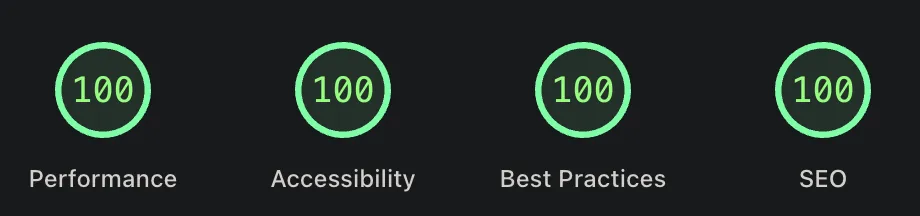
Key contributors: zero client JS by default, compile-time image optimization, immutable asset caching, and proper font loading with font-display: swap.
Key takeaways
- Astro's zero-JS default makes it ideal for content sites. You get fast pages without fighting the framework.
- Keystatic gives you CMS comfort without database dependencies or vendor lock-in.
- Cloudflare Workers offer edge-speed hosting with a generous free tier.
- Claude Code genuinely speeds things up - but only when you give it proper project context via
CLAUDE.md.
You don't need a complex stack for a fast, professional tech blog. Pick the right tools, keep them focused, and get out of the way.
Let me know what you think on LinkedIn or Twitter.