
Blocking DoH with OPNsense using FQDN domain lists
This as an improved version of a previous blog post that explains how to block DoH (DNS over HTTPS) or other traffic with OPNsense using FQDN (fully qualified domain name) lists - an undocumented feature in OPNsense.
Why blocking DoH
Many IoT devices and mobile applications try to use 3rd party DNS servers to bypass local DNS servers for serving ads or sending usage data. This can easily be prevented by blocking outgoing DNS traffic from clients directly and only allow DNS resolution via a Pi-hole or other privacy aware solution.
Some devices go a step further and "phone home" by using DoH, therefore circumventing local DNS servers entirely. This has a shady taste and that is reason enough to block it.
But how can DoH be blocked? Since DoH traffic from a Layer 3/4 firewall perspective is almost identical to legitimate HTTPS traffic it can't easily be distinguished from legitimate traffic without deeply inspecting every single network traffic packet. The latter might be feasible in a corporate enterprise setup but will be beyond the capabilities of most home use setups.
A pragmatic but still somewhat effective approach is to block well known DoH servers. While this may not catch advanced malware providing their own DoH servers it may still catch the majority of average IoT devices which want to bypass local DNS servers using DoH.
A static IP blocklist would not be ideal for this since the underlying IP addresses of DoH servers may change over time and one would have to keep track of this in near real-time to still have an effective IP based blocklist. Using a FQDN based list is a much more flexible approach to this challenge. Also many DoH servers are only provided as FQDN name lists.
FQDN blocklists with PF / OPNsense
While it is not officially stated in the OPNsense documentation the following statement in the OpenBSD PF documentation hints at the fact that it is indeed possible to use FQDN lists as input for PF rules.
src_addr, dst_addr — The source/destination address in the IP header. Addresses can be specified as: A single IPv4 or IPv6 address. A CIDR network block. A fully qualified domain name that will be resolved via DNS when the ruleset is loaded. All resulting IP addresses will be substituted into the rule.
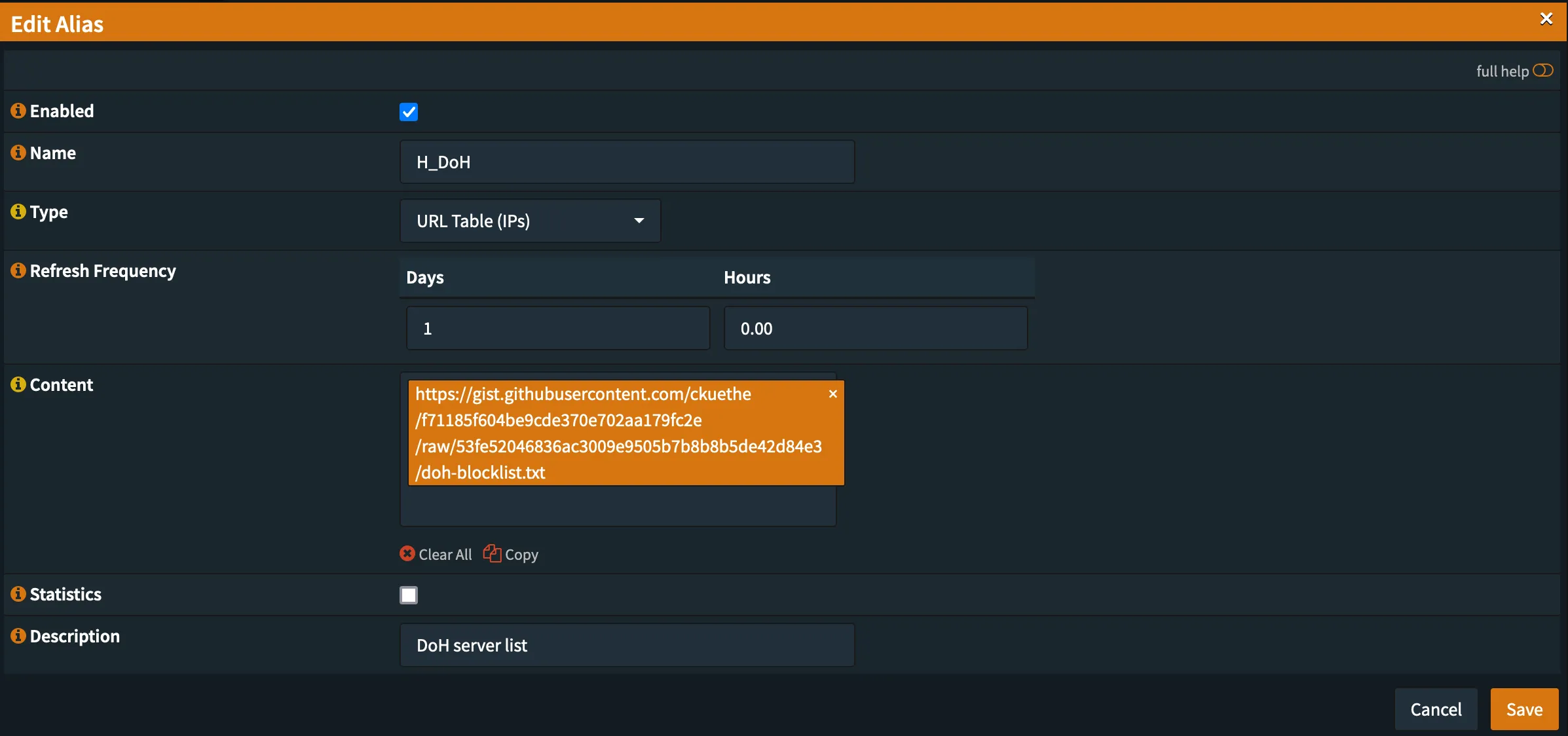
Since OPNsense also uses PF it is as simple as creating a new firewall alias of the type URL Table (IPs) and provide the blocklist URL as the alias content.
DoH blocklists
Hagezi — Encrypted DNS (primary)
Hagezi's DNS blocklists include a dedicated encrypted DNS list covering DoH, DoT and DoQ servers with roughly 3,980 domains. It is updated multiple times per day and draws from multiple curated sources.
FQDN list (OPNsense resolves domains to IPs):
https://cdn.jsdelivr.net/gh/hagezi/dns-blocklists@latest/domains/doh.txt
Pre-resolved IP list (no DNS resolution needed):
https://cdn.jsdelivr.net/gh/hagezi/dns-blocklists@latest/ips/doh.txt
Hagezi also offers a broader bypass prevention list that additionally covers VPN, TOR and proxy bypass methods if you want more aggressive blocking.
dibdot — DoH IP blocklists (supplementary)
dibdot/DoH-IP-blocklists is a good supplementary list with roughly 1,426 domains and hourly automated updates. It draws from different source data than Hagezi, providing defense in depth.
- Domains:
https://raw.githubusercontent.com/dibdot/DoH-IP-blocklists/master/doh-domains.txt - IPv4:
https://raw.githubusercontent.com/dibdot/DoH-IP-blocklists/master/doh-ipv4.txt - IPv6:
https://raw.githubusercontent.com/dibdot/DoH-IP-blocklists/master/doh-ipv6.txt
Setting up the alias
Create a new alias in OPNsense using the URL Table (IPs) type and paste the blocklist URL as the content. OPNsense will resolve any FQDNs in the list to IP addresses automatically.
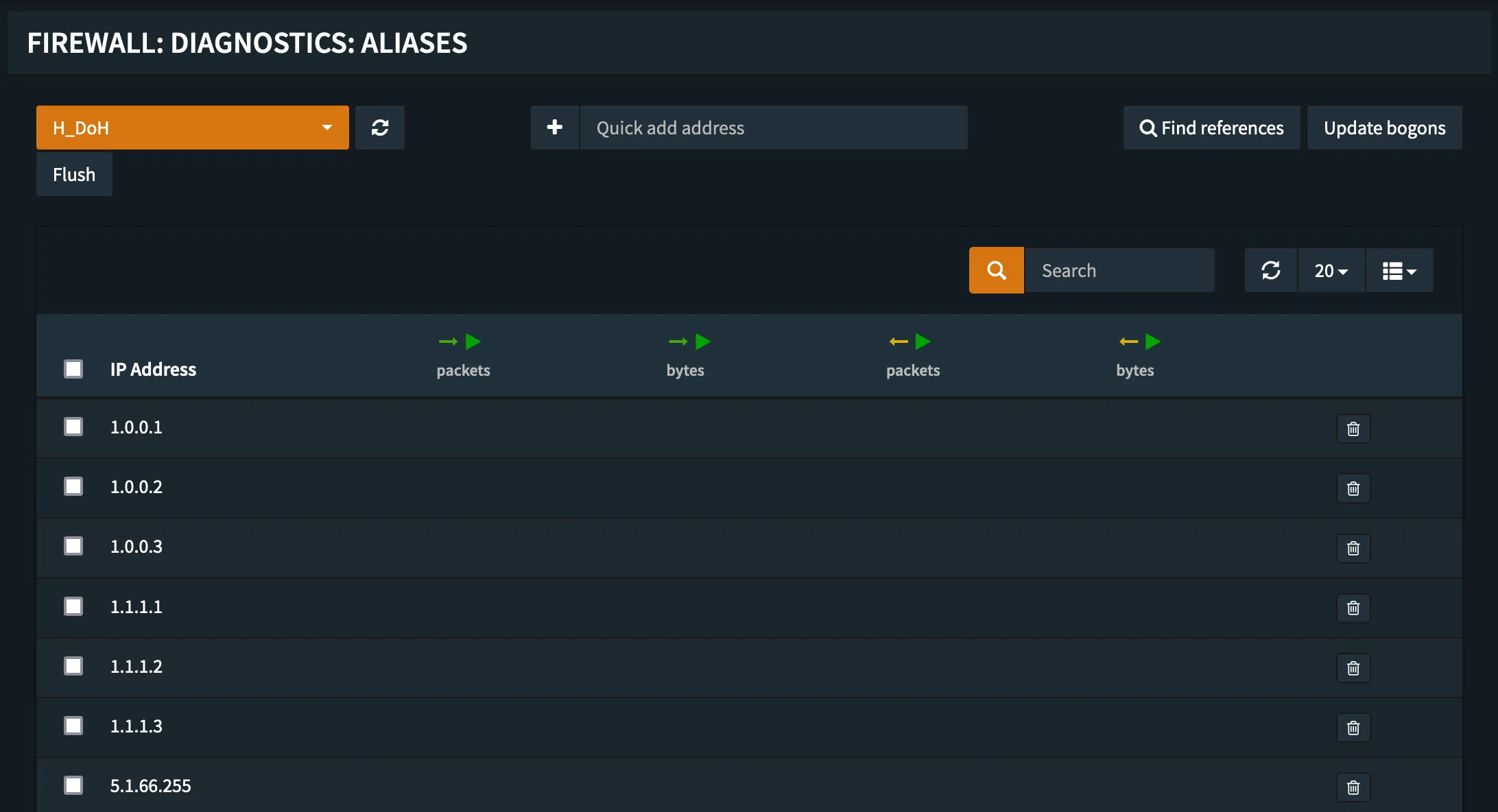
After creating the alias, verify that the FQDNs resolve correctly in the Firewall -> Diagnostics -> Aliases section.
The FQDNs get resolved into IP addresses every time the list is loaded therefore the fetching frequency should be at least daily.
Creating the firewall rule
With the alias in place, create a firewall rule to actually block the traffic:
- Navigate to Firewall -> Rules -> LAN
- Add a new rule with action Block
- Set the destination to the
H_DoHalias created above - Set the destination port to 443 (HTTPS)
- Add a description like "Block DoH servers"
- Save and apply changes
This will block all outbound HTTPS traffic from LAN clients to known DoH servers, forcing them to fall back to your local DNS resolver.
Covering DoH3 and DoQ
DNS over QUIC (DoQ) and DoH over HTTP/3 are also common bypass methods. These protocols use UDP port 443 instead of TCP. To cover these as well, duplicate the block rule for UDP port 443 with the same alias. This ensures both TCP-based DoH and UDP-based DoH3/DoQ traffic to known servers is blocked.
Result
With the provided DoH blocklist and the undocumented OPNsense feature of using FQDNs in firewall rules we now have a basic DoH blocking capability established. While it is by its very nature not bullet proof it should still be able to capture average IoT devices trying to bypass the local DNS for phoning home or reaching out to ad servers.
For a complementary approach to DNS-level filtering, see Blocking Ads and Malware with Pi-hole which covers curated blocklists for ad and malware blocking at the DNS level.
Photo by Sebastiaan Stam on Unsplash